

You’ve asked AI to create a presentation. It gives you a wall of text. You need a budget spreadsheet with working formulas. It hands you static numbers. You upload a PDF form that needs filling out. It tells you what should go in each field but doesn’t actually fill it.
Sound familiar?
This is where most AI assistants stop—and where Claude Skills begins. Skills are specialized capabilities that help Claude produce professional-grade outputs with proper formatting, structure, and functionality built in.
Think of them as expert training modules that transform Claude from a helpful assistant into a true productivity partner.
In this article, we’ll see together Claude Skills use cases to inspire you to work better, without spending more time working !
What Are Claude Skills ?
Claude Skills are instructions that teach Claude best practices for specific tasks. They’re like having a specialist looking over Claude’s shoulder, ensuring every document, presentation, or spreadsheet meets professional standards. It’s one path forward Agentic AI.
There are two types:
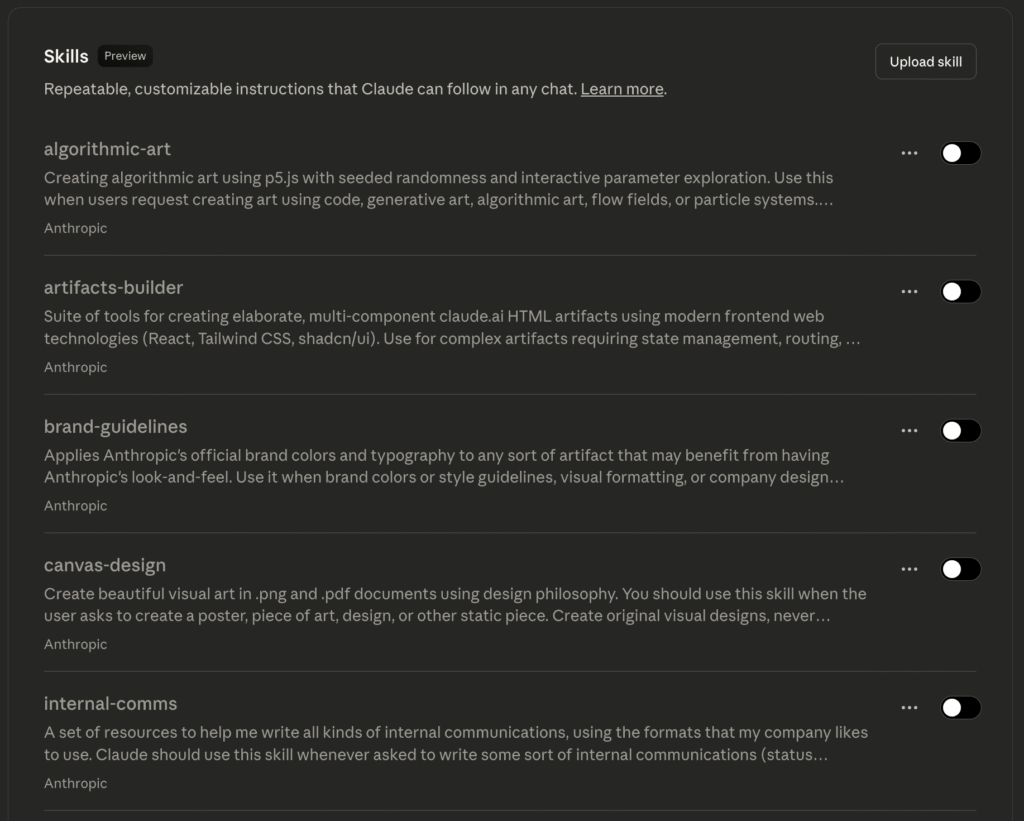
Built-in Skills come ready to use—no setup required. These cover the most common professional tasks: creating Word documents, PowerPoint presentations, Excel spreadsheets, and PDFs. They’re just an option to activate inside the Claude Settings.
Custom Skills are ones you create yourself for your unique workflows. Need every report to follow your company’s style guide? Want forms filled out according to specific regulations? You can build a skill for that.
The Built-In Power Tools : Practical Claude Skills use cases
Let’s look at real scenarios where Skills make the difference between “AI helped” and “AI delivered.”
Use Case 1 : Business Reports That Look Professional
Without Skills: You ask for a quarterly report. Claude gives you good content, but it’s plain text. You spend 30 minutes formatting headers, adjusting spacing, setting up page numbers, and making it look presentable.
With the DOCX Skill: You ask for the same report. Claude creates a properly formatted Word document with:
- Consistent heading styles throughout
- Automatic table of contents
- Professional spacing and margins
- Page numbers and headers
- Tables that actually look like tables, not ASCII art
Real Example: “Create a Q4 sales report with sections for revenue, key metrics, and regional performance.”
The difference? A document you can send directly to stakeholders instead of a draft you need to rebuild.
Use Case 2 : Presentations That Actually Present
Without Skills: You request a pitch deck. Claude outlines what each slide should contain. Now you’re copy-pasting into PowerPoint, choosing layouts, and hoping the design looks coherent.
With the PPTX Skill: Claude creates the actual presentation file with:
- Consistent design across all slides
- Proper title and content layouts
- Bullet points that make sense visually
- Image placeholders positioned correctly
- Professional transitions and formatting
Real Example: “Make a 10-slide pitch deck for our mobile app, including problem, solution, market size, business model, and team slides.”
You get a presentation file ready for your meeting, not homework to do before your meeting.
Use Case 3 : Spreadsheets That Calculate
Without Skills: You need a budget tracker. Claude suggests what columns to include and describes formulas you should use. You’re still building the spreadsheet yourself.
With the XLSX Skill: Claude creates a working Excel file with:
- Formulas that actually calculate
- Proper cell formatting (currency, percentages, dates)
- Named ranges for easier reference
- Conditional formatting to highlight important values
- Data validation to prevent errors
Real Example: “Create a monthly budget tracker with categories for housing, food, transportation, and entertainment. Include a summary that shows totals and percentage of income.”
You get a spreadsheet that works immediately—just plug in your numbers and it calculates everything.
Use Case 4 : Forms That Get Filled Correctly
Without Skills: You have a complex PDF form to fill out. Claude reads it and tells you what information goes where, but the PDF itself remains blank.
With the PDF Skill: Claude actually fills in the form with:
- All fields completed accurately
- Checkboxes marked appropriately
- Date fields formatted correctly
- Text that fits within field boundaries
- Multi-page forms handled consistently
Real Example: “Fill out this visa application form with my information” (with your details provided).
No more printing, writing by hand, scanning, or wrestling with PDF editors.
Your Custom Advantage : How to leverage Claude Skills ?
Built-in Skills are powerful, but Custom Skills let you teach Claude your specific way of working.
Example: Company Brand Standards
Maybe your organization has strict brand guidelines. Every document needs:
- Specific fonts and colors
- Logo placement rules
- Standard footer text
- Particular heading hierarchy
- Mandatory legal disclaimers
With a Custom Skill: You create one skill document that captures these rules. From then on, every document Claude creates for you automatically follows your brand standards. No more manual fixes, no more “oops, forgot the disclaimer.”
Example: Regulatory Compliance
If you work in healthcare, finance, or legal fields, documents often require specific formatting for compliance. A custom skill can encode these requirements:
- HIPAA-compliant documentation structure
- SEC filing formats
- Legal brief templates with proper citations
- Audit documentation standards
Your custom skill becomes institutional knowledge that doesn’t forget and doesn’t make mistakes.
Why Claude Skills matters ?
Here’s the honest comparison: Most AI tools, including ChatGPT, are excellent conversational partners. They can write, analyze, and explain brilliantly. But when you need actual files—documents you can use, presentations you can deliver, spreadsheets that calculate—there’s often a gap between the AI’s output and what you actually need.
Claude Skills bridges that gap. Instead of AI giving you instructions, it gives you results.
The practical impact:
- Time saved: Minutes to hours per task, depending on complexity
- Quality improved: Professional formatting without manual work
- Consistency maintained: Every output follows the same standards
- Errors reduced: Proper structure means fewer mistakes
It’s the difference between an AI that helps you work and an AI that does the work.
Getting Started
If you’re using Claude, Skills are already available. When you ask Claude to create a document, presentation, spreadsheet, or PDF, Claude automatically uses the appropriate skill.
For custom skills, you can create them through the Claude interface. Think of them as instruction manuals you write once and Claude follows forever.
Try it yourself:
- Ask Claude to create something you’d normally spend time formatting
- Notice what comes back isn’t just content—it’s a complete, usable file
- Think about what custom skills would help your specific workflow
The Bottom Line
AI is great at generating ideas and content. Claude Skills make it great at generating finished work. That’s not a subtle difference—it’s the difference between a helpful suggestion and a completed task.
Whether you’re creating reports, presentations, budgets, or forms, Skills ensure you’re not just getting better answers—you’re getting better results.
Ready to see the difference? Ask Claude to create something you need. The real test isn’t what Claude says about it. It’s whether you can use what Claude creates.